By Inara Pey
The first phase of the new UI has arrived as a Development Viewer release (3.2.1 (243328)). So what do we have in store?
No Modes
Well, actually, quite a lot, and it’s obvious right from the login screen, where the absence of the BASIC and ADVANCED modes is clear.

No mode options!
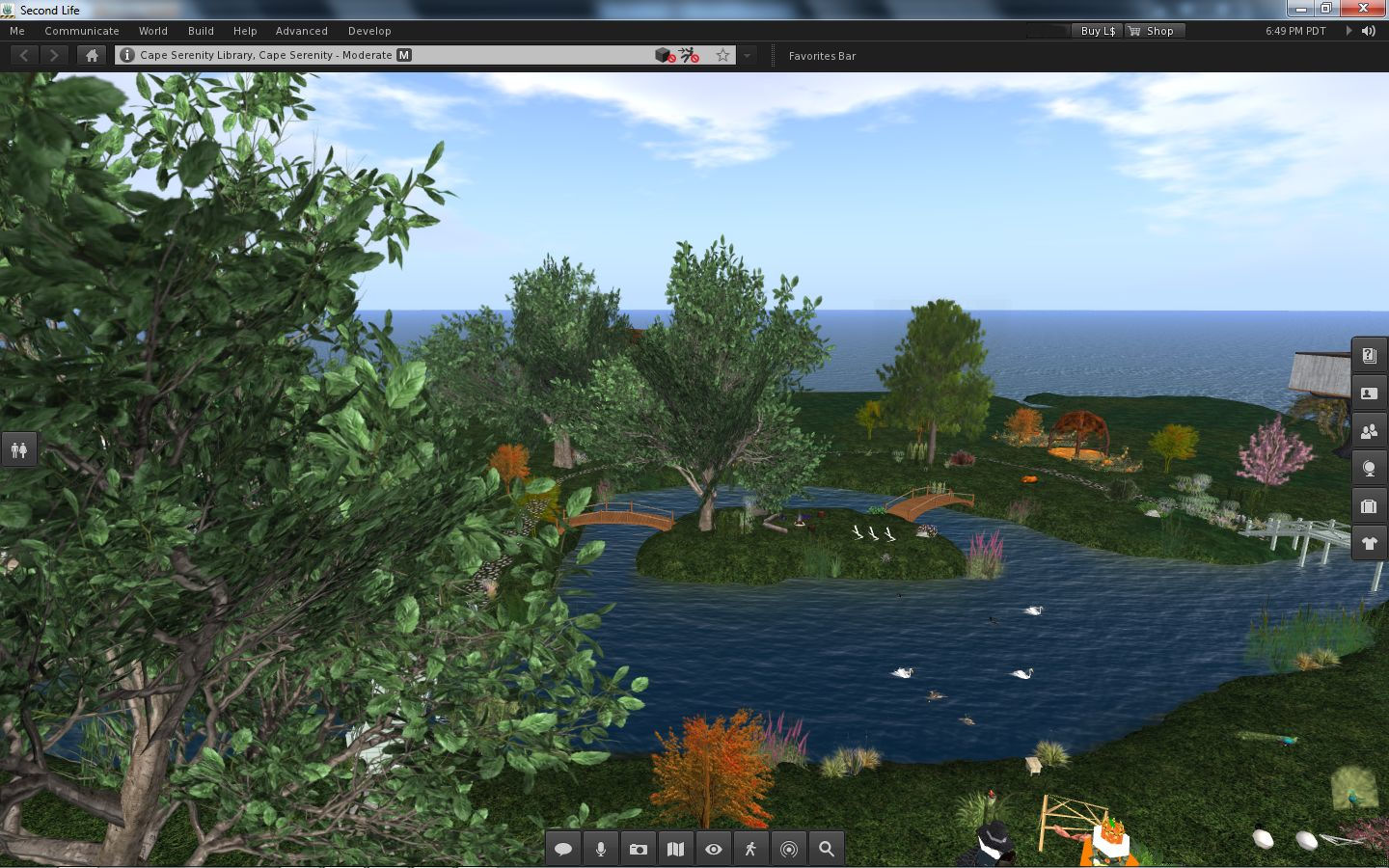
Once logged-in, more differences make themselves immediately felt:
- The top of the UI has been revised so that the Navigation and Favourites bars have been combined, with a slider between the two allowing you to adjust their sizes relative to one another
- There is a new button up on the Menu Bar I’ll return to shortly
- There are no Sidebar tabs visible on the right of the screen
- There is no chat bar at the bottom of the screen
- There are two sets of buttons visible: one on the left, featuring icons only (by default), and one at the centre bottom of the screen, featuring text and icons (by default).

The default UI on logging-in
If you want to type, you can either click the CHAT button on the bottom toolbar, select NEARBY CHAT from the COMMUNICATE menu (as per previous versions of the Viewer) or, in a move that follows V1 behaviour, tap ENTER. All three options will display the chat bar in its own repositionable floater.
Buttons, Buttons, Buttons
As there are a lot of them, let’s start with the buttons – most of which should be perfectly obvious.

On the left of the screen, we have by default, seven buttons. These are: Avatar, Appearance, Inventory, Search, Places Map, Nearby Voice and Mini-map. All of these will be familiar to V2/V3 users. They perform the same functions as in earlier releases of the Viewer; although in the case of Appearance, Inventory and Places, rather than opening them in the Sidebar, the buttons open the Appearance (outfit), Inventory and Places panels in their own floaters.
I have to admit, Mini-map had me fooled for a moment – the button’s icon suggests it is something to do with Voice.
Only Avatar is a new button here, lifted directly out of the BASIC mode. Clicking it opens up floater than enables you to pick an entire avatar look – shape, skin, clothes, etc. Four types of avatar are provided with the development release: human, animal, robot and vehicle. One suspects further choices (such as other races) will be added in time.
At the bottom of the UI is the more familiar toolbar with the following options: Chat, Speak, Destinations, People, Profile, View, Move and How To.

Of these, Chat enables the chat floater, as described above, while Speak, View and Move do exactly what they did in previous releases of the Viewer. People and Profile display the People and Profile panels from the Sidebar, now in their own floaters, leaving Destinations and How To.
Both of these will be familiar to those who have tried the BASIC mode: Destinations displays a mini Destination Guide floater, with destinations split into categories: What’s Hot Now, Chat, Newcomer, popular Places, and so on.

Destinations Floater

How To
How To is something I’d
speculated / hoped would be carried over from the BASIC mode as a part of the merge. I was a big fan of How To when it made its debut in the BASIC mode, as it is a simple, easy to use “cue-card” system for obtaining help, especially for those new to SL. If I’m honest, it is something I banged on at Rodvik about back when it first appeared, I was that enthusiastic about it, so I’m really pleased it has come up into the revised UI.
True, I’d personally like to see the range of topics it covers increased (without going completely overboard), but perhaps further topics will be added over time.
Within How To, the GET LIVE HELP option is new – it wasn’t in the BASIC mode. At first my oldbie heart soared on seeing it, as it seemed to herald the return of the long-gone and sadly lamented Live Help as used to be in Viewer 1.x.
Sadly, this is not the case. Selecting the option displays this message:
“Need help?
“Click the button below to teleport to a Help location where a Second Life guide is available to assist you between the hours of 10am – 6pm PST.”
Beneath it is a TELEPORT button, which in turn opens the Places floater, from which you should, in theory, be able to teleport to a suitable help location. Quite what or where this help location is and who staffs it (one assumes resident volunteers) is unknown. I’m not sure if it is because I tried the option after 18:00 SLT or simply that the function isn’t working as yet – but Places came up a blank, leaving me nowhere to teleport.
So, back to the buttons…
Looking at the layout, one might end up thinking that all LL have actually done is swapped a set of ugly tabs and screen-hogging slidey Sidebar and replaced them with a set of buttons on the left of the screen.
And one would be entirely wrong. Why? Because these buttons are movablebuttons. Not only that, they are customisable (to a degree). For example, right-click on any of the sets of buttons and a prop-up displays a menu with the options CHOOSE BUTTONS, ICONS AND LABELS and ICONS ONLY.
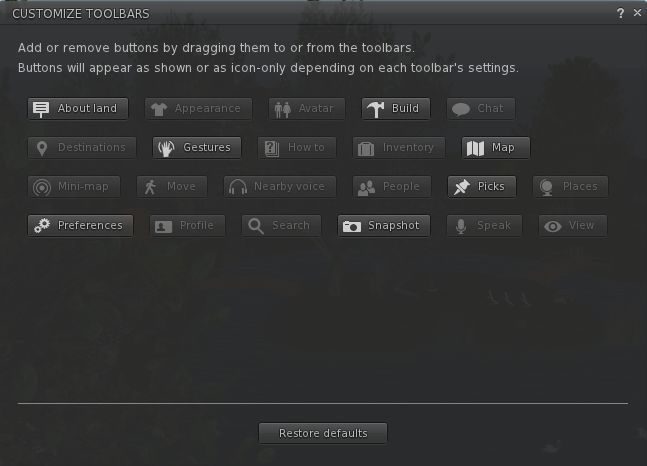
The latter two options allow you to switch between displaying the buttons with icons only (as is the case by default with the buttons on the left side of the screen) or with an icon and text (as is the case with the buttons on the bottom of the screen). But it is when you select CHOOSE BUTTONS that things start to get interesting, because this displays a Button Toolbox floater (which can also be accessed via CTRL-T or the TOOLBARS option of the ME menu).

Button Toolbox
This contains all the buttons available to you within the UI. Any buttons that you haven’t yet used are highlighted for easy identification. Note here, as well, that there are a few new buttons to play with, notably ABOUT LAND, PICKS AND PREFERENCES (yes, you can now have one-click access to the Viewer Preferences!).
To add a button to your UI simply position the mouse pointer over it, click and hold the LEFT mouse button and drag the button from the toolbox.
As you do this, you’ll notice the border on three sides of the Viewer turns blue, indicating you can position the button either on the left, bottom or right side of the screen. Nor does it end there.
You can also move buttons between locations (left side, right side and bottom of the screen) using the same method: simply left-click and hold over each button you wish to move in turn, and drag it to your preferred location. Thus, it is perfectly possible to have all your buttons placed at the bottom of the screen a-la V1, or you can split your buttons between the bottom and right of the screen, a-la a “traditional” V2 style.

You choose where the buttons go
Shopping, Anyone?
A final, subtle button has found its way into the UI, as mentioned earlier. Sitting up on the top right of the menu bar is a button with a shopping trolley icon. Clicking it will display the SL Marketplace in your web browser.
Menus, Preferences, Camera and Floaters

Me menu: re-organised
Away from the buttons and toolbars, the menus have slight attention paid to them – the options available on the ME menu have been reordered as well as now including an option to display the Button Toolbox floater.
The Viewer Preferences floater and tabs are all also largely unchanged, although any options relating to the Sidebar have been removed (unsurprisingly) and, in the Development release at least, the ADVANCED options for GRAPHICS are also turned on by default.
I was rather expecting to see a new camera floater, particularly as
Rodvik had indicated one would be forthcoming. However, in this release at least, the floater hasn’t changed from earlier releases of the Viewer. Perhaps that is still to come. Click-to-move is in the Viewer, however (although it has been present in the last 2 or 3 Development releases at least).
By default, most of the floaters appear to open on the left side of the screen, but as with earlier releases, they can easily be dragged around the screen and positioned where required, and that position will persist between uses / log-ins.
Elsewhere, and in keeping with all recent development Viewer releases, land is talked about in terms of capacity rather than prims, and builds in terms of impact rather than prim counts / PE.
Performance
It is perhaps unfair to look at performance given this is a Development release. However, I’d have to say at this point in time it is pretty cruddy. On my usual system (Intel Q6600 quad-core 2.3Ghz, 3Gb Windows 7 32-bit system with a GE9800 GT with 1Gb), my average fps was around 19-22 when on a sim on my own. If I went anywhere where there were other people, this immediately fell to around 7-8fps. As soon as I hit somewhere crowded (i.e. more than 8 people), my fps sank to 3-4 and I could barely move. Dropping Draw distance obviously helped (I usually benchamark with Draw set to either 256 or 320m), but to get this Viewer to claw its way back to 5-6fps on the busy sim I had to drop Draw down to 64m. Ouch. I didn’t even make any attempt to enable shadows.
Initial Opinion
I have to admit, the UI changes are pretty good so far. There is something here that should please just about everyone, user-wise. the configurable toolbar buttons mean that those who like a specific V1-style of UI layout can go some way to reproducing it in the new Viewer (buttons along the bottom of the screen and the Chat bar over – although it would be nice to have an option to hide this once more on tapping ENTER, again a-la V1.x).
For those who have grown accustomed to using the Sidebar, it is possible to re-arrange the buttons to mimic the look of the Sidebar tabs to a certain degree, even if the Sidebar slide action cannot be reproduced when opening floaters.
Overall, the new look is very clean and the buttons small enough to leave one’s view relatively uncluttered without the icons becoming idiotically small, leading to a feeling that one’s world view is very much larger than previously. Using text with buttons placed on either side of the screen can be more intrusive, but I get the feeling most people will opt to make more use of the bottom of the screen where buttons are concerned, rather than the left and right sides.
I can see the new approach causing some consternation among TPV developers – many of whom have wrestled hard with the issue of Viewer adoption through trying to come up with the means to present those reluctant to switch to V3′s UI with something that is more V1-like – and the customisation available here potentially undermines that work. Others have been working to make better and more pragmatic use of the Sidebar, and they are likely to feel its removal as something of a kick in the kneecap – although again, to be fair, that the Sidebar was going has been known about since mid-August.
However, for all the positives around it in terms of customisation and button placement and cleaner look, I have to say there is not enough here to entice me away from Firestorm. I’m happy to remain with that Viewer and see how the team adapt to, and adopt, this new interface.
If you opt to try out this release of the Viewer for yourself, remember that it can be temperamental and there are a number of
known issues – many of which can result in a crash.
The release itself can be found on the
Alternative Viewers page of the wiki, under the heading Second Life Development Viewer. Again, note that as a Development Viewer, the version number displayed prior to downloading may be different to the one given in this article, as the Dev Viewer is subject to frequent updates.
Update, 19th October
- As pointed out by Cinders in the comments, messages and prompts (such as completed teleport messages) now appear towards the upper right-hand corner of the UI, rather than bottom left
- In a nice touch, dialogues in the top right are displayed with a matching icon (so script dialogues are displayed with a prim icon over them, for example). If you have multiple dialogues displayed, you can “page” between them by clicking on the appropriate icon.

Dialogue boxes displayed top right, with icons